


Buying a house is one of the most exciting moments in life. Whether it’s a new HDB flat, condominium, or landed property, the next exciting step is decorating and designing your home. However, many homeowners face the same challenge — they know what they like, but they don’t know how to design it.
Traditionally, people relied on interior designers to visualize their dream home. While professional designers are still valuable, technology has changed the game. Today, AI home design tools allow homeowners to visualize layouts, experiment with furniture arrangements, and explore interior styles within minutes.
That’s where AI for home design comes in, and it’s changing everything.
Even if you have zero design experience, AI can help you transform simple ideas into realistic visual concepts. All you need is a floor plan, a few prompts, and your imagination.
In this guide, we’ll explore how beginners can use AI home design tools to plan and visualize their homes easily.
Why Designing Your Home Can Be Difficult for Beginners
Designing a home sounds fun, but it often becomes overwhelming quickly. Many homeowners struggle with questions like:
- What color should the walls be?
- Will this sofa match my living room?
- Can the dining table fit in the space?
- Which interior design style should I choose?
Without visualizing the layout, it’s difficult to imagine how everything will look together.
This is where AI home design tools become incredibly useful. Instead of guessing, you can generate visual previews of your space instantly.
For example, you can upload your floor plan and ask AI to:
- Generate a modern Scandinavian living room
- Suggest minimalist bedroom layouts
- Visualize different wall colors and furniture styles
This helps homeowners make smarter design decisions before spending money on furniture or renovation.
How AI Is Changing Home Design
Artificial Intelligence has made design more accessible than ever before.
Previously, creating a 3D interior design model required professional software like SketchUp or AutoCAD. Today, AI tools can generate interior designs with just a text prompt or an uploaded floor plan.
Some ways AI is transforming home design include:
1. Instant Interior Design Visualization
AI can convert simple descriptions into realistic interior design concepts.
Example prompt:
“Modern minimalist living room with light wood furniture, soft beige sofa, warm lighting, and indoor plants.”
Within seconds, AI can generate multiple design variations.
2. AI Floor Plan Visualization
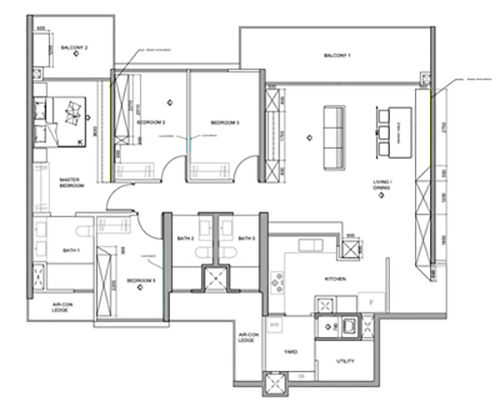
If you have a floor plan from your property developer, AI can turn it into a visual layout.
You can ask AI to:
- Convert a 2D floor plan into a 3D layout
- Show different furniture arrangements
- Suggest space-saving ideas
This is especially useful for Singapore HDB flats, where space optimization is important.
3. Experimenting with Different Interior Styles
Many homeowners are unsure which style suits them best.
AI allows you to instantly test different design themes such as:
- Scandinavian
- Modern minimalist
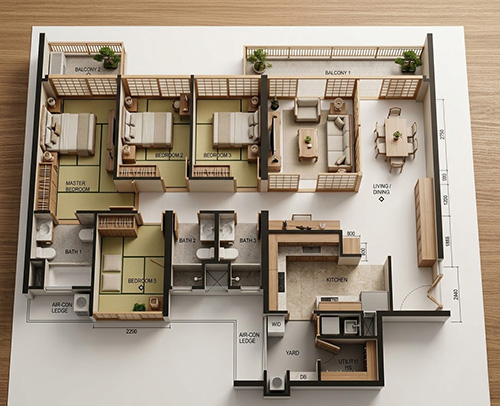
- Japanese Zen
- Industrial loft
- Contemporary luxury
By comparing different styles visually, you can find the one that matches your taste before you commit.
4. Testing Wall Colors and Materials
Choosing colors can be stressful.
AI allows you to experiment with:
- Different paint colors
- Wood textures
- Marble finishes
- Tile patterns
Instead of imagining how it might look, you can see it instantly.
5. It Saves You Time and Money
One of the biggest advantages of using AI for home design is the cost savings. Hiring a professional interior designer in Singapore can cost anywhere from S$3,000 to S$15,000 or more, depending on the scope of the project. AI tools, on the other hand, often offer free plans or affordable subscriptions starting from just a few dollars a month.
Step-by-Step Guide: How to Design Your House Using AI
Step 1: Get Your Floor Plan
Start with your house floor plan. This could be from:
- HDB BTO brochure
- Property developer
- Real estate listing
- Architectural drawing
Even a simple image works.
Step 2: Upload the Floor Plan to an AI platforms
You can upload your floor plan to the favourite AI platforms like ChatGPT, Gemini. etc
Step 3: Use the follow prompt
Use the uploaded floor plan image as the exact blueprint reference.
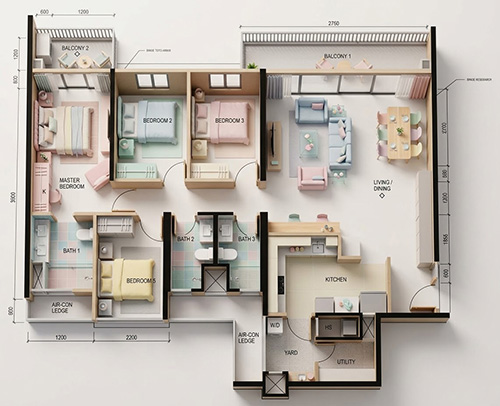
Convert the 2D architectural floor plan into a hyper-realistic 3D miniature architectural scale model, strictly preserving the exact layout, room positions, wall shapes, door placements, and proportions from the uploaded image.
Do not redesign, rearrange, or reinterpret the layout. The miniature model must exactly match the uploaded floor plan structure.Thick black lines = structural walls → vertical miniature walls
Thin lines with curved arcs = doors → arc indicates swing direction
Narrow openings in exterior walls = windows
Room labels define room function and furniture placement
All doors, windows, and walls must be positioned exactly according to the blueprint. Do not invent new openings or modify wall positions. The flat blueprint should transform into a detailed miniature dollhouse, with the house rising directly out of the printed floor plan paper, which remains visible underneath as the base.
Include the following rooms and features:
Main bedroom & additional bedrooms
Living and dining area
Kitchen
Bathrooms / WC
Service yard
Air-con ledge
Household shelter
Each room should contain tiny hyper-realistic furniture placed logically:Bedrooms: low-profile beds, bedside tables, sleek lamps, clean-lined storage units (walls pastel-colored: soft pink, mint, baby blue, or cream)
Living room: modular sofas, coffee tables, media consoles, minimalist décor (walls in soft pastel tones)
Dining area: simple polished dining table, modern chairs, uncluttered design (walls pastel)
Kitchen: sleek cabinets, integrated appliances, stove, sink, refrigerator, minimal accessories (walls pastel)
Bathrooms: floating vanities, clean tiles, modern fixtures, glass shower partitions (walls pastel)
Service yard: washing machine, utility items (minimal and functional, walls pastel)
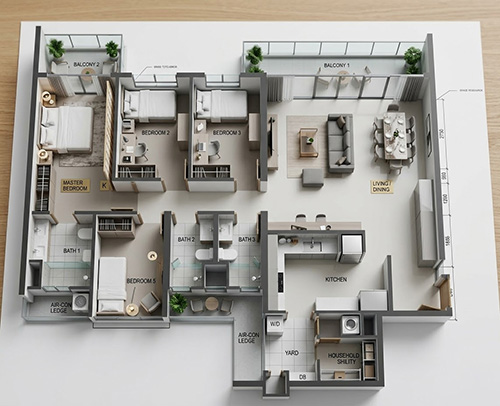
The structure should be shown in dollhouse cutaway style, with roof removed and some walls partially cut away so interior layout and furniture are clearly visible. The miniature sits on top of a printed architectural blueprint sheet placed on a wooden desk, like a handcrafted scale model built directly on the drawing.
Style: Modern miniature design with pastel-colored walls only, soft and neutral color palette for walls (pink, mint, baby blue, cream), furniture and flooring realistic and modern, cohesive miniature craftsmanship.
Lighting: soft bright studio lighting, diffuse shadows, natural reflections, consistent across all rooms to enhance the pastel walls.
Camera angle: top-down isometric perspective (~45°), showing the entire apartment layout while revealing interior rooms.
Depth of field: shallow macro effect to emphasize miniature scale while keeping details crisp.
Render quality: ultra-realistic, high-resolution, 8K photorealistic render, sharp edges, precise textures, cinematic architectural visualization, pastel wall aesthetic.
Final Thoughts
Designing your home should be an exciting journey, not a stressful one.
Thanks to AI tools, homeowners can now visualize and experiment with their space before making any major decisions. Whether you’re planning a Singapore HDB renovation or decorating a new apartment, AI can help you explore design ideas quickly and easily.
You don’t need to be an interior designer to create a beautiful home. With AI, all it takes is a floor plan, creativity, and a few prompts.
Start experimenting, explore different styles, and turn your dream home into reality.
Frequently Asked Questions (FAQ)
1. Is AI accurate enough to use for real renovations?
AI tools are great for visualizing ideas and exploring different design possibilities. They can be a helpful first step when planning your dream home and make it easier to discuss your ideas with your interior designer or contractor. This is particularly important in Singapore, where HDB and BCA renovation regulations must be carefully followed.
2. Can I use AI to design the my entire house, not just one room?
Absolutely! Many AI allow you to design multiple rooms and create a cohesive design plan for your entire home. You can work room by room and ensure that the overall aesthetic is consistent throughout.
3. Do I need any design experience to use AI tools?
You don’t need any design experience. With the right prompt, you can simply tell the AI what you want, and it will generate design ideas for you.
4. What is the best free AI tool design?
A good place to start is with free tools like ChatGPT or Gemini, which can help you generate design ideas using simple prompts.
Example Designs Created from This Prompt
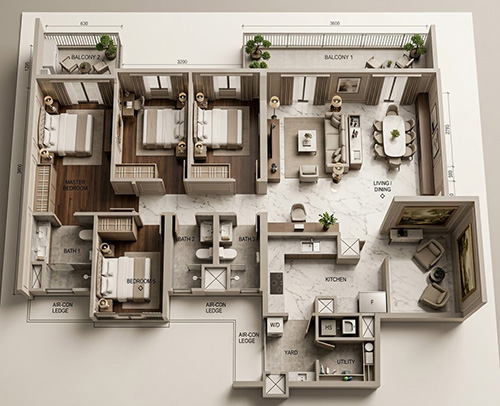
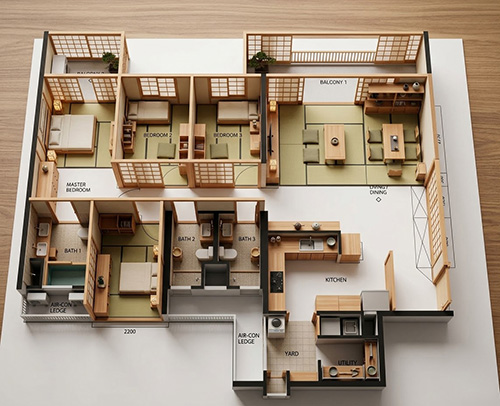
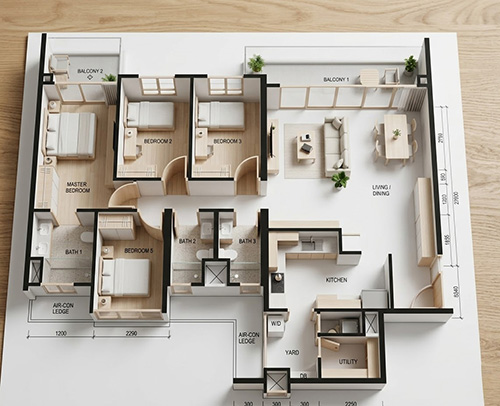
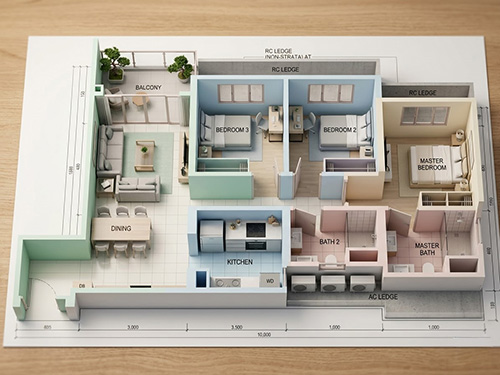
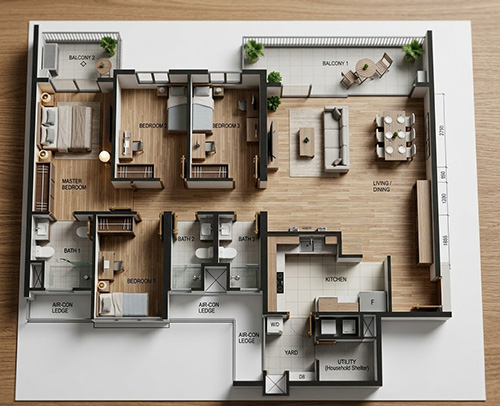
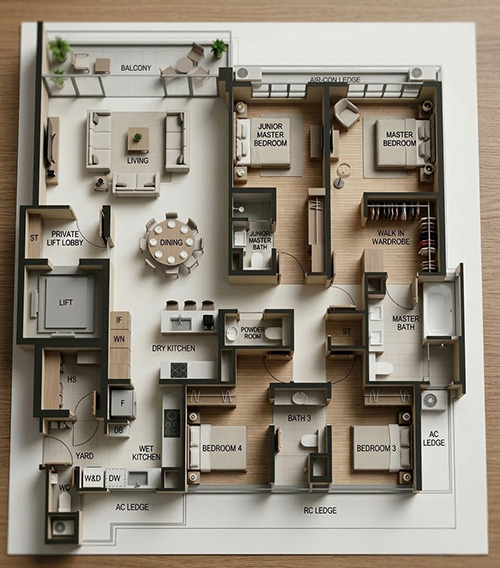
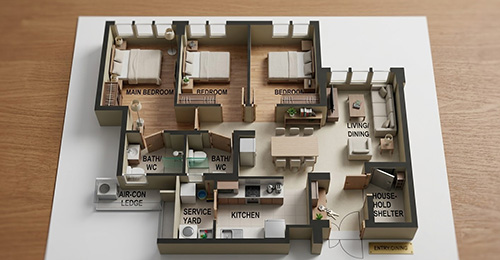
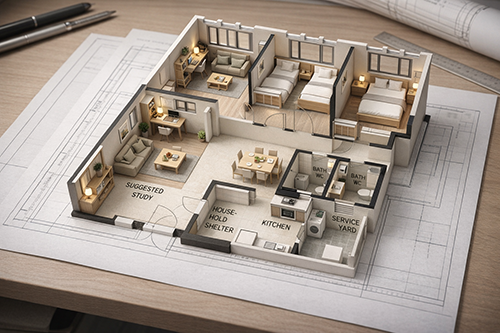
3D Miniature House Prompt Template
Since you’ve read this far, here’s a prompt template you can use to customize the design style to your preference.
1) Fixed Blueprint Instructions (Do Not Change)
Use the uploaded floor plan image as the exact blueprint reference.
Convert the 2D architectural floor plan into a hyper-realistic 3D miniature architectural scale model, strictly preserving the exact layout, room positions, wall shapes, door placements, and proportions from the uploaded image.
Do not redesign, rearrange, or reinterpret the layout. The miniature model must exactly match the uploaded floor plan structure.
Blueprint interpretation rules:
Thick black lines = structural walls → vertical miniature walls
Thin lines with curved arcs = doors → arc indicates swing direction
Narrow openings in exterior walls = windows
Room labels define room function and furniture placementAll doors, windows, and walls must be positioned exactly according to the blueprint.
Do not invent new openings or modify wall positions.The miniature house must rise directly out of the printed floor plan paper, which remains visible underneath as the base.
2) User customization section (Users Change This)
DESIGN STYLE: [Modern / Scandinavian / Japandi / Minimalist / Luxury / Industrial / Cozy]
WALL COLOR STYLE:
[pastel colors / warm neutral tones / earth tones / monochrome / natural wood tones]PRIMARY WALL COLORS:
[pink / mint / baby blue / cream / beige / soft grey / warm white]FURNITURE STYLE:
[minimalist modern furniture / Scandinavian wood furniture / luxury marble furniture / industrial metal furniture]FLOORING MATERIAL:
[light oak wood / walnut wood / marble tiles / terrazzo / concrete]DECOR STYLE:
[minimal decor / indoor plants / modern art / cozy textiles / luxury decor]LIGHTING MOOD:
[bright daylight / soft studio lighting / warm cozy lighting / cinematic lighting]
3) Room Furniture Logic (Keeps Results Realistic)
Each room should contain tiny hyper-realistic furniture placed logically:
Bedrooms:
bed, bedside tables, lamps, wardrobe or storageLiving room:
sofa, coffee table, TV console, minimal décorDining area:
dining table with chairsKitchen:
cabinets, sink, stove, refrigeratorBathrooms:
floating vanity, sink, toilet, shower areaService yard:
washing machine and utility items
4) Dollhouse Visualization Style
The structure should appear in dollhouse cutaway style, with the roof removed and some walls partially cut away so the interior layout and furniture are clearly visible.
The miniature model sits on top of the printed blueprint sheet placed on a wooden desk, like a handcrafted architectural model built directly on the drawing.
5) Camera & Render Settings
Camera angle:
top-down isometric perspective (~45°) showing the entire apartment layout.Depth of field:
shallow macro effect to emphasize miniature scale.Lighting:
soft studio lighting with natural reflections.Render quality:
ultra-realistic, high resolution, 8K photorealistic architectural visualization.
6) Example (User Changing Style)
DESIGN STYLE: Scandinavian
WALL COLOR STYLE: pastel
PRIMARY WALL COLORS: soft pink, mint green, cream
FURNITURE STYLE: light wood Scandinavian furniture
FLOORING MATERIAL: light oak wood
DECOR STYLE: minimal decor with indoor plants
LIGHTING MOOD: soft daylight
Bonus
Scandinavian Style
DESIGN STYLE: Scandinavian
WALL COLOR STYLE: soft pastel
PRIMARY WALL COLORS: cream, soft pink, mint
FURNITURE STYLE: light wood Scandinavian furniture
FLOORING MATERIAL: light oak
DECOR STYLE: minimal plants
LIGHTING MOOD: bright daylight
Japandi Style
DESIGN STYLE: Japandi
WALL COLOR STYLE: warm neutral
PRIMARY WALL COLORS: beige, warm white, light wood
FURNITURE STYLE: low-profile wood furniture
FLOORING MATERIAL: natural oak
DECOR STYLE: minimal Japanese decor
LIGHTING MOOD: soft warm lighting
Luxury Style
DESIGN STYLE: Luxury modern
WALL COLOR STYLE: elegant neutral
PRIMARY WALL COLORS: cream, marble white, soft gold
FURNITURE STYLE: luxury modern furniture
FLOORING MATERIAL: marble
DECOR STYLE: elegant decor
LIGHTING MOOD: cinematic lighting